


Tuesday, 18 September 2012


DLL FILE FIXER FULL VERSION

Now You don't have to face that problem again and you can use your favorite application even you have some kind of .Dlls file missing problem.
This software .dlls file fixer solve your problem by fixing this error on your windows. This is very simple and user friendly and easy to use.
It is very nice and effective tools to solve your .ddls file missing problem.
Its scan your windows and search for the problem and also solve that problem.
we cant fully rely on this as it have partners with Microsoft also and more leading brands also.
It also make your your PC's performance fast and clean.
DOWNLOAD HERE
Steps to Install and use the software
1) Install software
2) Open the Crack folder and copy Dlls-Files.com fixer.exe
3) Paste it on the base location i.e. [C:\Program Files\Dll-Files.com Fixer]
thats the default path of the software.
4) If it in other language then At the right top corner of the application there is small symbol of flag.
5) Please make it to United States [for english] . You can select as you want.
thats it
Close the Application and now again run the application. That will of Full version.
Wise care 365

It keeps your windows Clean by deleting unwanted files and solve your Registry key problem also and thus make its work fast.
Wise care 365 is an Important tool for your PC containing the solution of registry, Disk, and other system utilities.
It is very easy to use and user friendly. It is very effective tool also for your PC. Its is an good choice to solve your PC registry problem and some of temp files problem. Its make your PC performance fast.
Feature:-
- User friendly
- Clean up, defragment and optimize the Windows Registry.
- Protect your privacy by erasing personal tracking data
- Recover lost files
- Hide important files or folders
- Prevent unauthorized use of personal applications
- Auto shut down your PC
- Free up Memory to boost game and enterprise software performance
- Simple "One Click Tune-up" option will optimize your PC.

Tune up utilities 2012 Full Version

Features of TuneUp Utilities :
1. Boosts Overall PC Speed.
2. Helps you too Defragment Drives.
3. Enabling and Disabling Start Up Programs can be done within program etc.
DOWNLOAD HERE
Tune up utilities 2012 Keys:D6RM68-PYCKX8-BAHDYP-E12A7F-B9Q42V-ME6JNK
3EJXWT-XJ0V9T-XERBFA-8JTMHW-2DYJ3A-R1CTNY
MDJCMH-V9YPKX-939PRF-JDNJJ0-KW9YM8-M64MXV
D1H58Q-M3YNX6-Q96YJV-57BMVK-N986MW-AMWVNC
Sunday, 16 September 2012
Wednesday, 5 September 2012
TRACE EMAIL
1. Log into your account and open the email in question.
2. Click on the down arrow that’s to the right of the Reply link. Choose Show Original from the list.

Now here’s the technical part that I was telling you about earlier! You need to look for the lines of text that start with “Received: from“. It might be easier to simply press Cntrl + F and perform a search for that phase. You’ll notice that there are several Received From’s in the message header. This is because the message header contains the IP addresses of all of servers involved in routing that email to you.

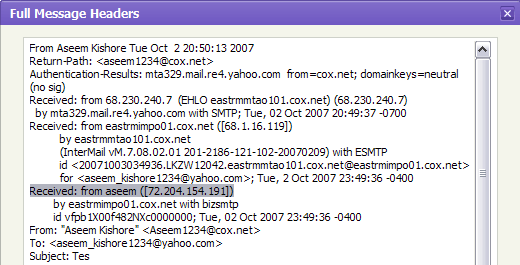
To find the first computer that originally sent the email, you’ll have to find the Received From that’s farthest DOWN. As you can see from the above image, the first one is from a computer called “aseem”with the IP address 72.204.154.191. Then it was routed to my ISP’s server ateastrmmtao104.cox.net and so on and so forth till it got to your email server.
The computer aseem is my personal home computer and that’s my public IP address for my house! I’ll go through Yahoo and Outlook before talking about tracking the location of that IP address.
Yahoo Mail Beta
1. Log into your account and open the email (if you’re using Yahoo Mail Beta with the new preview interface, make sure you double-click on the email so that it opens in a new tab)
2. At the top right, you’ll see there is a drop-down option where Standard Header is selected by default.
3. Click on it and choose Full Header.

Again, you’ll see the same information as before, just in a different window:
1. Open the email in Outlook by double-clicking on it
2. Go to View at the top menu (the menu options for the email, not the main Outlook window) and chooseOptions.
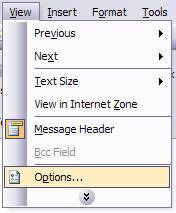
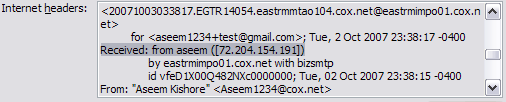
You’ll get a dialog box where you can set the message options and at the bottom you’ll see the Internet Headers box. For some silly reason, the box is very small and you have to scroll a lot, so it’s best to simply copy and paste the text into Notepad to view it more easily.
Tracking the location of an IP address
Now that we have our originating IP address of 72.204.154.191, let’s find out where that is! You can do this by perform a location lookup on the IP address. My favorites are IP2Location and GeoBytes IP Locator.
GeoBytes gave me a big map of New Orleans, LA along with a bunch of other information about the location itself.

IP2Location also gave me the same information pretty much, including the ISP (Cox Communications). Of course, this is correct since I live in New Orleans!
If you want more information, you can do a WHOIS database search also. My favorite one is the Network Solutions. This will give you information on who hosts that IP address and their registration information. You can always contact them to try and find more information on that particular IP address.
Subscribe to:
Posts (Atom)